

#
国際化 (i18n)
SillyTavernは複数の言語をサポートしています。このガイドでは、翻訳を追加および管理する方法について説明します。
おそらくあなたはここにいます。あなたの言語でテキストが翻訳されていなくて、それがイライラしているからです。まず、中国語(繁体字)ロケールでいくつかの欠落している翻訳を修正した方法を紹介します。それぞれが異なる理由で欠落していたため、独自の欠落している翻訳を修正する方法についてかなり良い考えを得ることができます。
第2部では、以下を見ていきます:
i18nがSillyTavernでどのように機能するか 翻訳を作成およびコードで使用する方法 欠落している翻訳を見つけるためのデバッグ関数 新しい言語の追加 変更の貢献
extensionを開発したり、コアコードを変更したりする場合は、i18nを念頭に置いてHTMLとJavaScriptを作成してください。このようにして、他の人があなたの作品を彼らの言語に翻訳する準備ができます。
誰も15言語を単独で知りません。SillyTavernを誰もが利用できるようにするために一緒に働きます。
世界中の誰もが携帯電話やコンピューターで自分の言語を使用できるはずです。
#
いくつかの欠落している翻訳を修正しましょう!
これら3つの問題はすべてコードの変更が必要でした。新しい翻訳を追加する場合、コードをまったく触る必要がないかもしれません。JSONファイルに翻訳を追加するだけです。中国語(繁体字)JSONファイルに大量の欠落している翻訳が最近追加されたため、残りの問題はすべてコードにありました。他のロケールでは、コードに触れずに修正できる多くの欠落している翻訳があります。
#
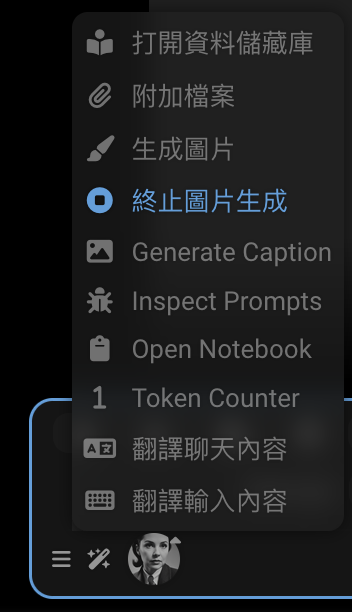
画像の生成
テキスト「Generate Image」は中国語(繁体字)ロケールで翻訳されていません。なぜですか?
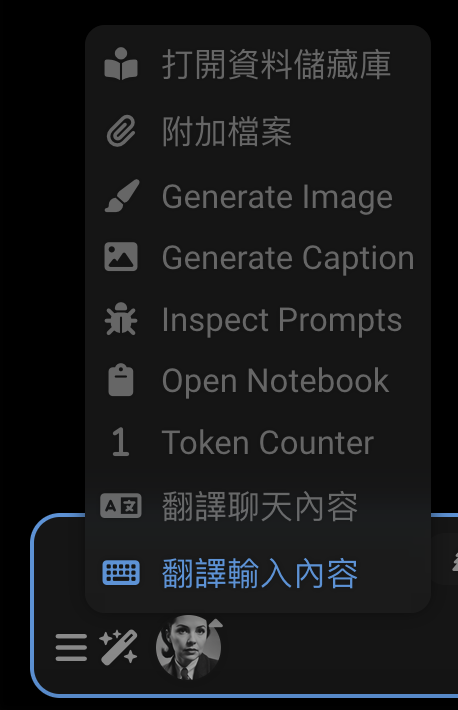
要素を右クリックして検査します。HTMLが表示されます:
<!--rendered HTML-->
<div class="list-group-item flex-container flexGap5 interactable" id="sd_gen" tabindex="0">
    <div data-i18n="[title]Trigger Stable Diffusion" title="觸發 Stable Diffusion"
         class="fa-solid fa-paintbrush extensionsMenuExtensionButton"></div>
    <span>Generate Image</span>
</div>そのdata-i18n属性はどこですか? 欠落しています! 追加しましょう。ソースコードで見つけます:
<!--public/scripts/extensions/stable-diffusion/button.html-->
<div id="sd_gen" class="list-group-item flex-container flexGap5">
    <div class="fa-solid fa-paintbrush extensionsMenuExtensionButton" title="Trigger Stable Diffusion"
         data-i18n="[title]Trigger Stable Diffusion"></div>
    <span>Generate Image</span>
</div>
<div id="sd_stop_gen" class="list-group-item flex-container flexGap5">
    <div class="fa-solid fa-circle-stop extensionsMenuExtensionButton" title="Abort current image generation task"
         data-i18n="[title]Abort current image generation task"></div>
    <span>Stop Image Generation</span>
</div>
幸運です。その文字列「Generate Image」は多くの言語ファイルにあります。中国語(繁体字)を含みます。
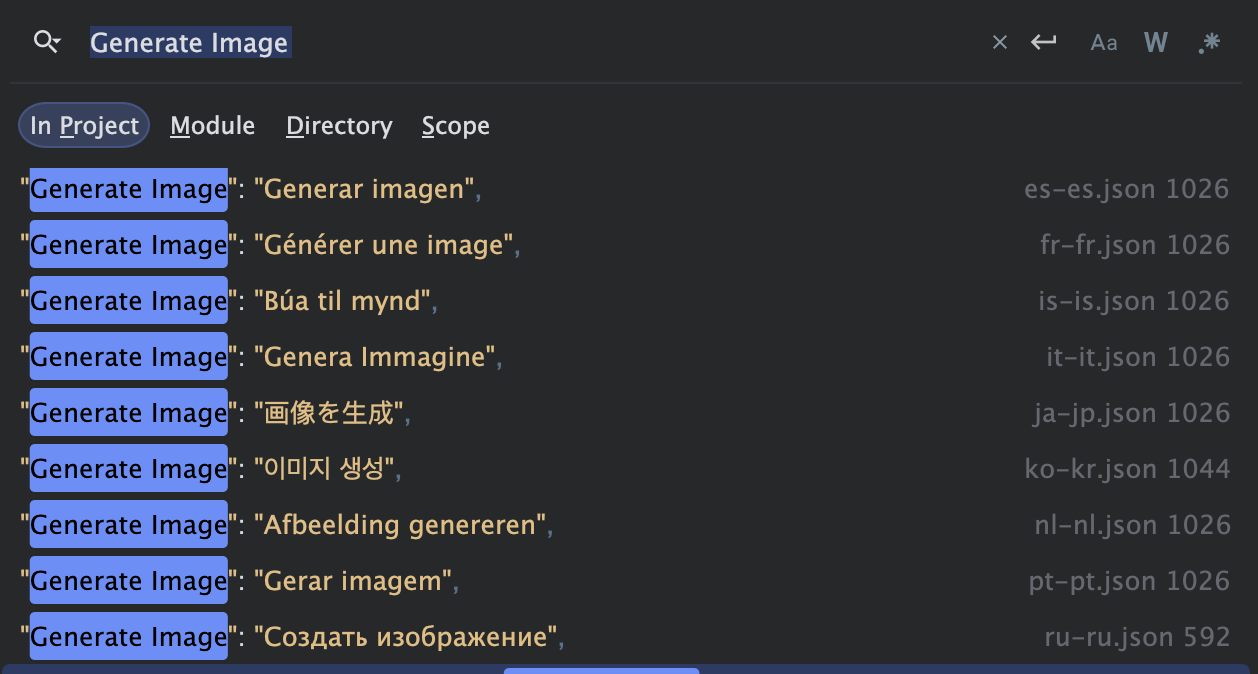
{
    "Generate Image": "生成图片"
}
なぜ表示されていないのですか? 要素を正しくワイヤリングする必要があります:
<!--public/scripts/extensions/stable-diffusion/button.html-->
<div id="sd_gen" class="list-group-item flex-container flexGap5">
    <div class="fa-solid fa-paintbrush extensionsMenuExtensionButton" title="Trigger Stable Diffusion"
         data-i18n="[title]Trigger Stable Diffusion"></div>
    <span data-i18n="Generate Image">Generate Image</span>
</div>
<div id="sd_stop_gen" class="list-group-item flex-container flexGap5">
    <div class="fa-solid fa-circle-stop extensionsMenuExtensionButton" title="Abort current image generation task"
         data-i18n="[title]Abort current image generation task"></div>
    <span>Stop Image Generation</span>
</div>
これで動作します! ページを再読み込みして確認してください。
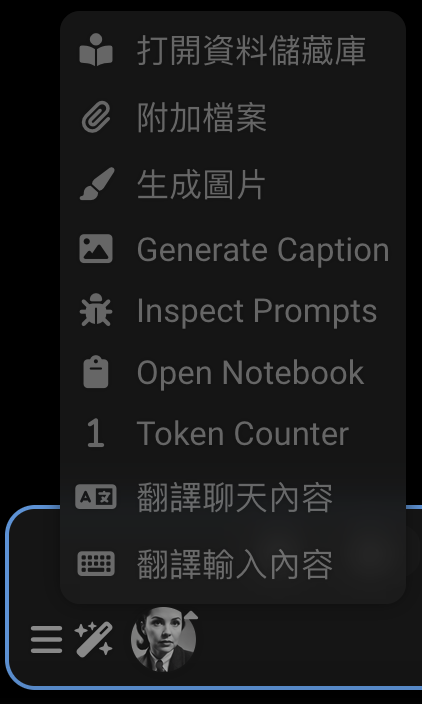
しかし、HTMLを開いているうちに、その下の「Stop Image Generation」はどうなのですか? HTMLが正しく見えません。
画像を生成してから、生成中にワンドメニューを開くと、翻訳されていないテキストが表示されます。
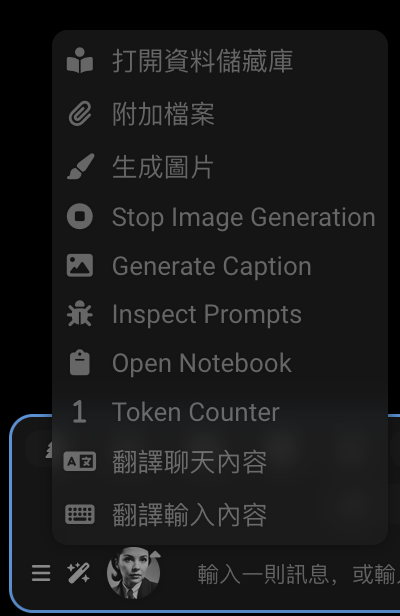
まずHTMLを修正します:
<!--public/scripts/extensions/stable-diffusion/button.html-->
<div id="sd_gen" class="list-group-item flex-container flexGap5">
    <div class="fa-solid fa-paintbrush extensionsMenuExtensionButton" title="Trigger Stable Diffusion"
         data-i18n="[title]Trigger Stable Diffusion"></div>
    <span data-i18n="Generate Image">Generate Image</span>
</div>
<div id="sd_stop_gen" class="list-group-item flex-container flexGap5">
    <div class="fa-solid fa-circle-stop extensionsMenuExtensionButton" title="Abort current image generation task"
         data-i18n="[title]Abort current image generation task"></div>
    <span data-i18n="Stop Image Generation">Stop Image Generation</span>
</div>
これだけでは問題を解決するには不十分です。中国語(繁体字)ファイルに「Stop Image Generation」の翻訳がありません。追加しましょう! 考えられる翻訳の1つを次に示します:
{
    "Stop Image Generation": "停止生成图片"
}
... 「Generate Image」翻訳の直後にJSONファイルに追加できます。
{
    "Generate Image": "生成图片",
    "Stop Image Generation": "停止生成图片"
}
Claudeとの議論の後、実際には次の翻訳を使用します:
- 繁体字中国語: "Stop Image Generation": "終止圖片生成"
- 簡体字中国語: "Stop Image Generation": "中止图像生成"
- 日本語: "Stop Image Generation": "画像生成を停止"
#
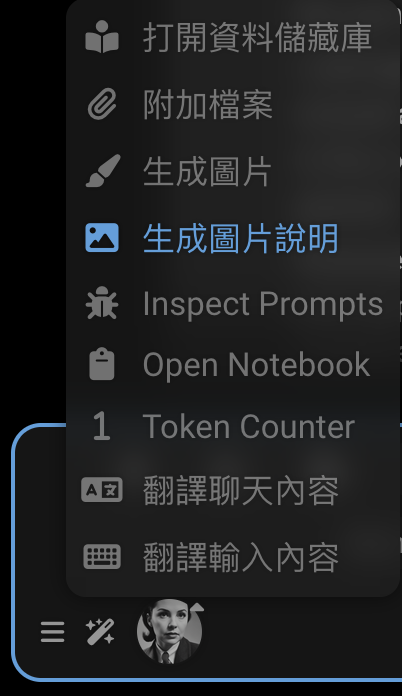
キャプションの生成
「Generate Caption」は中国語(繁体字)ロケールで翻訳されていません。修正しましょう!
どこにあるのか? 要素を検査します。
<!--rendered HTML-->
<div id="send_picture" class="list-group-item flex-container flexGap5 interactable" tabindex="0">
    <div class="fa-solid fa-image extensionsMenuExtensionButton"></div>
    Generate Caption
</div>
このHTMLはJavaScriptによって生成されます。ソースコードを見つけましょう。
// public/scripts/extensions/caption/index.js
const sendButton = $(`
        <div id="send_picture" class="list-group-item flex-container flexGap5">
            <div class="fa-solid fa-image extensionsMenuExtensionButton"></div>
            Generate Caption
        </div>`);
まずコードを修正する必要があります:
// public/scripts/extensions/caption/index.js
const sendButton = $(`
        <div id="send_picture" class="list-group-item flex-container flexGap5">
            <div class="fa-solid fa-image extensionsMenuExtensionButton"></div>
            <span data-i18n="Generate Caption">Generate Caption</span>
        </div>`);
中国語(繁体字)ファイルに「Generate Caption」の翻訳もありません。追加しましょう!
{
    "Generate Caption": "生成圖片說明"
}
次の翻訳を使用します:
- 繁体字中国語: "Generate Caption": "生成圖片說明"
- 簡体字中国語: "Generate Caption": "生成图片说明"
- 日本語: "Generate Caption": "画像説明を生成"
#
プロンプトの検査
テキスト「Inspect Prompts」は中国語(繁体字)ロケールで翻訳されていません。なぜですか? これはもう少し複雑です。テキストはJavaScriptによって生成されます。翻訳が欠落しています。
// Extension-PromptInspector/index.js
const enabledText = 'Stop Inspecting';
const disabledText = 'Inspect Prompts';
ご存知のとおり...どちらのフレーズもi18nファイルにはありません。追加しましょう。
{
    "Stop Inspecting": "停止檢查",
    "Inspect Prompts": "檢查提示"
}現在、JavaScriptコードを修正する必要があります。t関数を使用して翻訳を取得する必要があります。
// Extension-PromptInspector/index.js
import {t} from '../../../i18n.js';

const enabledText = t`Stop Inspecting`;
const disabledText = t`Inspect Prompts`;
Claudeから提案を得ました。文字列を保持し、コードを無視してください。JSONファイルに追加する必要があります。
// 1. 簡体字中国語 (zh-cn):
const enabledText = t`停止检查`;
const disabledText = t`检查提示词`;
// 2. 繁体字中国語 (zh-tw):
const enabledText = t`停止檢查`;
const disabledText = t`檢查提示詞`;
// 3. 日本語 (ja-jp):
const enabledText = t`検査を停止`;
const disabledText = t`プロンプトを検査`;
それらをJSONファイルにマージします。
{
    "Stop Inspecting": "停止检查",
    "Inspect Prompts": "检查提示词"
}
{
"Stop Inspecting": "停止檢查",
"Inspect Prompts": "檢查提示詞"
}{
"Stop Inspecting": "検査を停止",
"Inspect Prompts": "プロンプトを検査"
}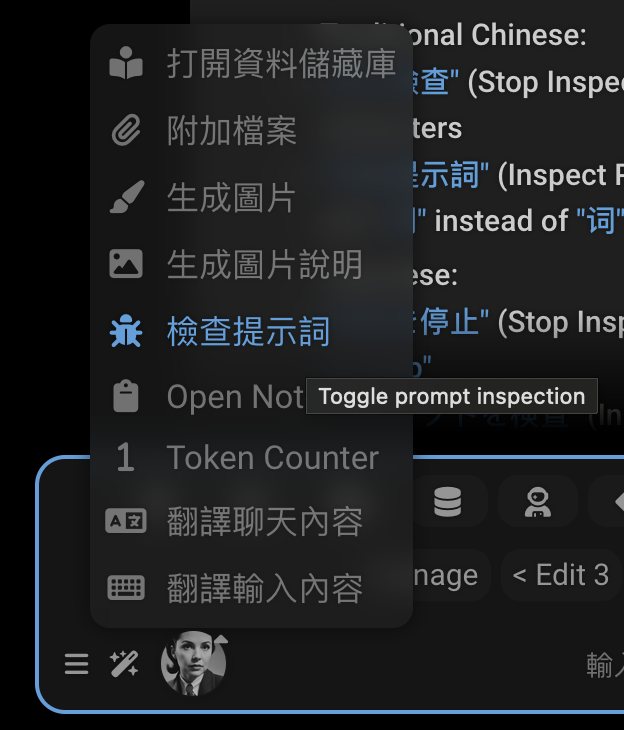
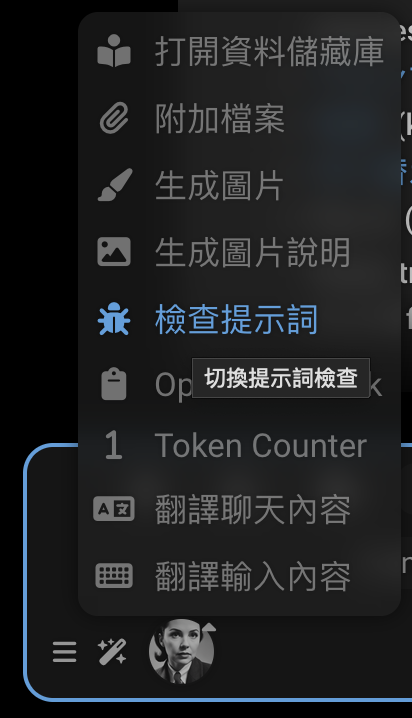
そのツールチップについては残念です。問題は、コードがt関数を使用していないことです。
launchButton.title = 'Toggle prompt inspection';extensionコードでそれを修正する必要があります。
launchButton.title = t`Toggle prompt inspection`;また、JSONファイルに翻訳を追加する必要があります。
{
    "Toggle prompt inspection": "切换提示检查"
}
{
"Toggle prompt inspection": "切换提示词检查"
}{
"Toggle prompt inspection": "プロンプト検査の切り替え"
}Prompt inspectorは別のextensionであるため、そのリポジトリにコード修正をPRします: https://github.com/SillyTavern/Extension-PromptInspector/pull/1
翻訳はメインSillyTavernリポジトリに追加されます。https://github.com/SillyTavern/SillyTavern/pull/3198
#
言語ファイル
各言語はpublic/locales/にあるJSONファイルを持っており、その言語コード(例:ru-ru.json)という名前が付けられています。
ファイルには、次のキーと値のペアが含まれています:
- キーは、元の英語テキストまたは一意の識別子です
- 値は翻訳されたテキストです
例:
{
    "Save": "Сохранить",
    "Cancel": "Отмена",
    "Could not find proxy with name '${0}'": "Не удалось найти прокси с названием '${0}'"
}
#
翻訳がどのように機能するか
翻訳がアプリケーションで使用される方法は2つあります:
HTML要素:
data-i18n属性を使用<div data-i18n="some_key">Default Text</div>HTMLのデフォルトテキストは、利用可能な場合は翻訳されたテキストに置き換えられます。
テンプレート文字列: JavaScriptコードで
t関数を使用t`Some text with ${variable}`これらの文字列は
${0}、${1}などのプレースホルダーを保持するように翻訳する必要があります。
SillyTavernはHTML要素とdata-i18n属性を使用して、翻訳可能なコンテンツをマークします。これを使用するにはいくつかの方法があります:
#
1. 要素テキストの翻訳
シンプルなテキストコンテンツの場合:
<span data-i18n="Role:">Role:</span>{
"Role:": "Роль:"
}これは要素のテキストコンテンツを「Role:」の翻訳に置き換えます。
#
2. 属性の翻訳
titleまたはplaceholderのような属性を翻訳するには:
<a class="menu_button fa-chain fa-solid fa-fw"
   title="Insert prompt"
   data-i18n="[title]Insert prompt"></a>
{
"Insert prompt": "Вставить промпт"
}[title]プレフィックスは、翻訳する属性を示します。属性値の残りは、JSONファイルのルックアップキーとして使用されるテキストです。コーダーが英語テキストをキーとして使用するのが一般的ですが、必須ではありません。キーは任意の一意の識別子です。
元の英語テキストは、対応する属性(title="Insert prompt")に存在する必要があります。翻訳が欠落している場合のフォールバックとして使用されます。特に、英語の翻訳ファイルはありません。
英語テキストの代わりに一意の識別子no_items_textをキーとして使用する例を次に示します:
<!--suppress HtmlUnknownAttribute -->
<div class="openai_logit_bias_list" no_items_text="No items"
     data-i18n="[no_items_text]openai_logit_bias_no_items"></div>
{
"openai_logit_bias_no_items": "没有相关产品"
}
#
3. 要素ごとの複数の翻訳
一部の要素にはコンテンツと属性の翻訳の両方が必要です。セミコロンで区切られます。最も一般的なパターンは、要素のテキストコンテンツとそのtitle属性の両方を翻訳することです:
<div data-source="openrouter" class="menu_button menu_button_icon openrouter_authorize"
     title="Get your OpenRouter API token using OAuth flow. You will be redirected to openrouter.ai"
     data-i18n="Authorize;[title]Get your OpenRouter API token using OAuth flow. You will be redirected to openrouter.ai">
    Authorize
</div>
{
"Authorize": "Авторизоваться",
"Get your OpenRouter API token using OAuth flow. You will be redirected to openrouter.ai": "Получите свой OpenRouter API токен используя OAuth. У вас будет открыта вкладка openrouter.ai"
}これは次のように翻訳します:
- 「Authorize」をキーとして使用した要素のテキストコンテンツ
- 「Get your OpenRouter API token using OAuth flow. You will be redirected to openrouter.ai」をキーとして使用したtitle属性
title属性と要素のテキストコンテンツの両方がフォールバックとして英語で提供されます。
複数の属性を翻訳することもできます:
<!--suppress HtmlUnknownAttribute -->
<textarea id="send_textarea" name="text" class="mdHotkeys"
          data-i18n="[no_connection_text]Not connected to API!;[connected_text]Type a message, or /? for help"
          placeholder="Not connected to API!"
          no_connection_text="Not connected to API!"
          connected_text="Type a message, or /? for help"></textarea>
あなたの言語ファイルの対応する翻訳は次のようになります:
{
    "Not connected to API!": "Нет соединения с API!",
    "Type a message, or /? for help": "Введите сообщение или /? для помощи"
}
ページが読み込まれると、システムは:
data-i18n属性を持つすべての要素を検索します[title]または[placeholder]のような属性プレフィックスを解析します- 言語のJSONファイルで各キーを検索します
- 要素のコンテンツまたは属性を翻訳されたテキストに置き換えます
#
動的テキスト
JavaScriptコード内の動的テキスト翻訳は、次のいずれかを使用します:
t関数を使用したテンプレートリテラル:toastr.warn(t`Tag ${tagName} not found.`);直接翻訳関数:
translate("Some text", "optional_key")
#
変数プレースホルダー
一部の文字列には${0}、${1}などを使用する動的値のプレースホルダーが含まれています:
toastr.error(t`Could not find proxy with name '${presetName}'`);{
"Could not find proxy with name '${0}'": "Не удалось найти прокси с названием '${0}'"
}キーと翻訳のプレースホルダーを同じに保ってください。システムは${0}をpresetNameの値に置き換えます。
#
欠落している翻訳を見つける
1つの迷惑な欠落している翻訳を修正したいだけでなく、すべてを見つけたい場合はどうですか?
これは大きな野心です!1つの翻訳を修正するだけでも価値があります。しかし、それらをすべてキャッチしたい場合は、ツールが必要です。
#
SillyTavern-i18n
https://github.com/SillyTavern/SillyTavern-i18n
フロントエンドローカライズファイルを操作するためのツール。
機能:
- HTMLファイルから新しいキーを自動的にローカライズに追加します。
- ローカライズファイルから欠落しているキーをプルーニングします。
- 自動Google翻訳を使用して、欠落している値に自動入力します。
- キーでJSONファイルをソートします。
#
ビルトインデバッグ関数
これらは User Settings > Debug Menuの下にあります。
#
欠落している翻訳を取得
現在のロケールのローカライズデータの欠落を検出し、データをブラウザーコンソールにダンプします。現在のロケールが英語である場合、他のすべてのロケールを検索します。
コンソールには、以下を含む欠落している翻訳の表が表示されます:
- key: 翻訳が必要なテキストまたは識別子
- language: 現在の言語コード
- value: 翻訳する英語テキスト
#
ロケールを適用
現在選択されているロケールをページに再適用します
これらのツールは完璧ではありません
- JavaScriptコード内の欠落している翻訳をキャッチできません
- HTMLの欠落している data-i18n 属性をキャッチできません。翻訳されていないキーをキャッチします
getMissingTranslationsコードにバグがあります: キーには[title]または[placeholder]をプレフィックスとして付けるべきではありません
#
新しい言語の追加
新しい言語のサポートを追加するには:
public/locales/lang.jsonに言語を追加します:{ "lang": "xx-xx", "display": "Language Name (English Name)" }翻訳を使用して
public/locales/xx-xx.jsonを作成します
#
貢献
翻訳の準備ができたら:
- JSONファイルが有効であることを確認します
- アプリケーションで徹底的にテストします
- GitHubプルリクエストを通じて送信します